


Unscripted Photography Posing
4.3341.00 Reviews
App Specs
- Version
- 4.10.2
- Updated On
- License
- Free
- Downloads
- 500,000+
- Developer
- Unscripted
- Categories
- Photography
- Platform
- Android
Screenshots

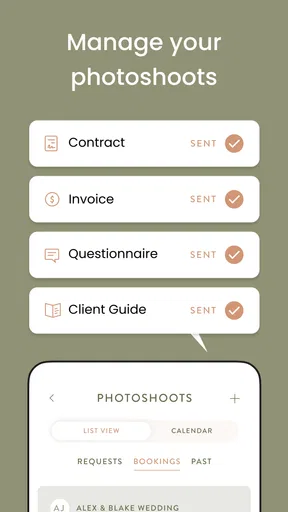
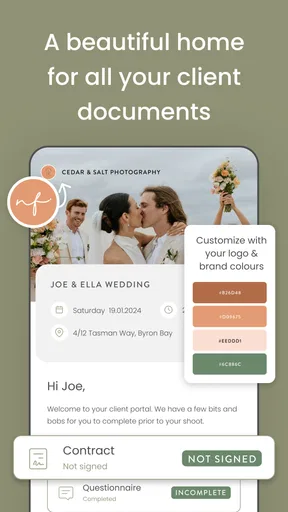
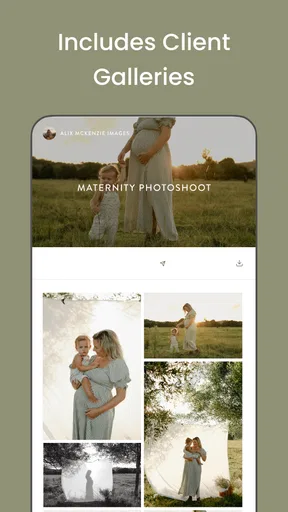
 Analysis by AppCompare
Hey there, photo enthusiasts! I’ve spent time with Unscripted Photography Posing, and it feels like a pocket-sized photography coach when I need help directing a shoot or want a few fresh ideas. Its appeal is practical: it gives me something to consult before or during a session, rather than asking me to invent every pose from scratch.
Where a little preparation pays off
I find the app most useful when I’m planning a portrait session with a clear subject in mind. Before meeting a couple, family, or individual, I can browse ideas and choose a small handful that suit the people and setting. That preparation matters more than collecting dozens of poses: a short, flexible plan is easier to remember and leaves room to respond naturally once the camera is out.
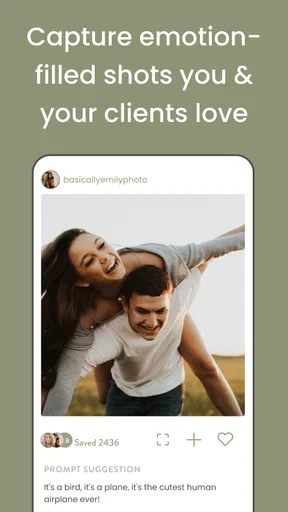
For a newer photographer, the value is not just having a pose to copy. A prompt can help turn a vague direction into an action a subject understands. For example, instead of asking someone to “look natural,” I can use a pose idea as a starting point and adapt it to the person’s comfort. I would still treat the suggestions as prompts, not rules; the best result often comes from adjusting rather than reproducing a reference exactly.
Useful before the shoot, different during it
There is a useful distinction between browsing at home and relying on a phone at a shoot. At home, I can take my time, compare options, and assemble a mood board without the pressure of keeping a session moving. On location, I want quick access to the few ideas I already chose, not a long stretch of scrolling while a subject waits. A little preparation makes the app feel like a tool rather than a distraction.
A realistic use case is a weekend family portrait in a park. I might pick a few poses in advance, then keep the session moving by adapting them to the family’s energy and the space available. If children lose interest or the light shifts, a prepared idea can be a useful fallback, but it should not dictate the whole shoot. I’d use the app to reduce hesitation, then pay attention to the people in front of me.
Connectivity is part of the workflow
Because I would not assume every resource is available without a connection, I’d do the browsing and planning before heading somewhere with unreliable reception. That is a small habit, but it can prevent an awkward pause when I want to check a reference on location. I also would not make a shoot depend on being able to load a particular screen at the exact moment I need it; a few notes or a remembered prompt are sensible backups.
Network access can shape other parts of a photography workflow too. Sharing galleries or checking planning information is more convenient when a connection is available, while a busy location may make it harder to concentrate on a phone regardless of signal. I’d keep any on-site app use brief and focused, and make the subject—not the screen—the center of the session.
Worth Reading Before You Choose

EA SPORTS FC Mobile 26 Is a Bigger Football Game, but It Takes Time

Flipboard Shows What News Apps Must Do Beyond the Feed

Switching to Android Auto Means Rethinking Your Driving Routine

Google Calendar Makes a Crowded Week Easier to Manage

Ludo King Makes the Most of the Minutes Between Plans

Baby Panda World Brings Quick Play to Modern Phones, but Its Game Library Feels Busy
Mobile use, with a little care
A phone is a natural companion for a photographer who is already using it to check a schedule, review a shot, or coordinate with a client. Still, looking down repeatedly can interrupt rapport. I’d select ideas before the session, keep the phone accessible, and bring it out only when a prompt would genuinely help. This is especially useful for portrait work, where relaxed conversation can matter as much as the pose itself.
Unscripted is the developer behind this free photography app. It has a 4.2 average from around 1,900 ratings, and more than 500,000 installs. It is rated for Everyone and was released on May 6, 2019. Version 4.8.20 supports Android 8.0 and newer, and optional in-app purchases range from $14.99 to $349.99 per item. The purchase range is worth noticing if I’m deciding how much of my workflow to place inside one app; I’d check the available options and cost in the app before committing.
First Impressions: A User-Friendly Interface
From the moment I opened the app, I was greeted by a clean and intuitive interface. The developers have clearly put a lot of thought into making the user experience as seamless as possible. Navigating through the app feels like a breeze, and everything is categorized neatly, making it easy to find exactly what you need when inspiration strikes.
Features That Stand Out
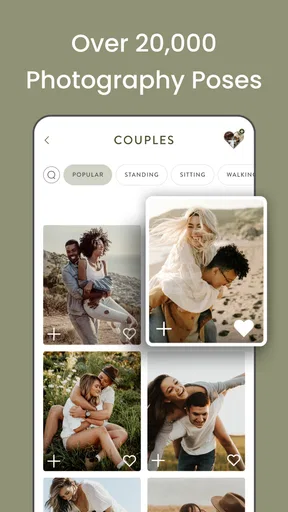
One of the coolest features of the app is the vast library of poses. Whether you’re shooting a couple, family, or even a solo portrait, there’s a treasure trove of ideas waiting to be explored. I love that each pose comes with a little description and tips on how to execute it effectively. It’s almost like having a mini photography class right in your hands.
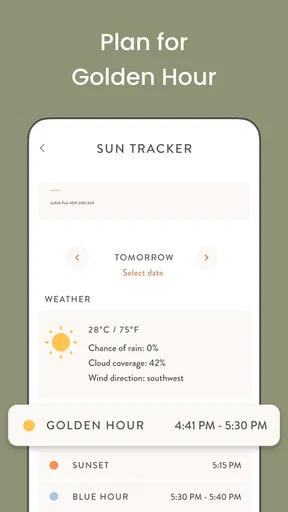
Another neat feature is the mood board option. You can create and save different boards for various shoots, making it super easy to keep your ideas organized. Plus, the app also offers a weather feature, so you can plan your outdoor sessions around the best lighting conditions. Talk about a lifesaver!
Inspiration Galore
If you're anything like me, sometimes you need a little spark to get those creative juices flowing. The app's inspiration section is perfect for that. It’s packed with stunning photo examples and stories behind the shots. I found myself scrolling through and feeling motivated to try new techniques and styles. The app encourages experimentation and stepping out of your comfort zone, which is always a good thing in the world of photography.
Practical Tips and Tutorials
What really sets the app apart, in my opinion, is the inclusion of practical tips and tutorials. It’s not just about poses; it’s about elevating your entire photoshoot experience. There are tutorials on lighting, angles, and even how to interact with your subjects to get the best results. It’s like having a seasoned pro whispering advice in your ear, helping you capture those magical moments effortlessly.
Room for Improvement
Now, while the app is pretty fantastic, there are a couple of areas that could use a bit of tweaking. For instance, some of the pose categories could be more expansive, especially for niche shoots like pet photography. Additionally, an offline mode would be a great addition for those times when you’re shooting in areas with spotty internet connections.
That said, these are minor gripes in the grand scheme of things. The app is regularly updated, so I’m hopeful these features might make an appearance down the line.
Choosing it over a general photography app
Compared with a general camera app, this one is aimed at the thinking around a portrait session rather than the act of taking the picture. It won’t replace the camera controls or editing tools I use elsewhere; its particular strength is helping me arrive with a plan for directing people. A notebook can do some of the same organizational work, but it takes more effort to gather visual references and pose guidance in one place. If I already have a reliable planning system and a strong repertoire of directions, the benefit may be smaller.
I’d also be realistic about the difference between inspiration and instruction. A reference can help me get started, but it cannot judge whether a pose suits a subject’s mobility, clothing, personality, or the space. I would adapt any suggestion for comfort and avoid making a client feel they have to match a picture exactly. That human judgment is still the photographer’s job.
Keeping the workflow dependable
If a screen or feature fails to load at a busy moment, I would not let that stall the shoot. I’d switch to a simple verbal prompt, use a pose I already know, or let the subject move naturally while I keep shooting. That is not a criticism unique to this app; it is a sensible way to avoid making a portrait session depend on a phone. The mood board is most valuable as preparation, not as something I need to consult every minute.
For data-conscious use, I’d browse the material I need while I have a dependable connection and avoid repeatedly opening sections just to keep them on screen. I’d also be selective about what I save into boards, organizing them around actual sessions rather than building a huge archive I never revisit. That makes the planning easier to scan and cuts down on phone use when the subject is waiting.
Who will get the most from it
I can see this being especially helpful for beginners, portrait photographers who want a prompt when directing people, and anyone who shoots several kinds of sessions and likes to prepare separately for each one. It is less compelling for someone focused mainly on landscapes, product photography, or fast-moving events, where pose guidance is not central. Pet photographers may also want a more specialized source, given the narrower coverage I noticed in that area.
First Impressions: A User-Friendly Interface
From the moment I opened the app, I was greeted by a clean and intuitive interface. The developers have clearly put a lot of thought into making the user experience as seamless as possible. Navigating through the app feels like a breeze, and everything is categorized neatly, making it easy to find exactly what you need when inspiration strikes.
Features That Stand Out
One of the coolest features of the app is the vast library of poses. Whether you’re shooting a couple, family, or even a solo portrait, there’s a treasure trove of ideas waiting to be explored. I love that each pose comes with a little description and tips on how to execute it effectively. It’s almost like having a mini photography class right in your hands.
Another neat feature is the mood board option. You can create and save different boards for various shoots, making it super easy to keep your ideas organized. Plus, the app also offers a weather feature, so you can plan your outdoor sessions around the best lighting conditions. Talk about a lifesaver!
Inspiration Galore
If you're anything like me, sometimes you need a little spark to get those creative juices flowing. The app's inspiration section is perfect for that. It’s packed with stunning photo examples and stories behind the shots. I found myself scrolling through and feeling motivated to try new techniques and styles. The app encourages experimentation and stepping out of your comfort zone, which is always a good thing in the world of photography.
Practical Tips and Tutorials
What really sets the app apart, in my opinion, is the inclusion of practical tips and tutorials. It’s not just about poses; it’s about elevating your entire photoshoot experience. There are tutorials on lighting, angles, and even how to interact with your subjects to get the best results. It’s like having a seasoned pro whispering advice in your ear, helping you capture those magical moments effortlessly.
Room for Improvement
Now, while the app is pretty fantastic, there are a couple of areas that could use a bit of tweaking. For instance, some of the pose categories could be more expansive, especially for niche shoots like pet photography. Additionally, an offline mode would be a great addition for those times when you’re shooting in areas with spotty internet connections.
That said, these are minor gripes in the grand scheme of things. The app is regularly updated, so I’m hopeful these features might make an appearance down the line.
Closing thoughts on when it fits
My overall take is that this is a practical companion for portrait planning, not a substitute for experience, camera controls, or conversation with a subject. I’d try it if I wanted fresh posing ideas and a way to organize references, especially when working with people who feel unsure in front of a camera. I’d skip it if I rarely photograph people or need a tool that works as a complete camera and editing suite.
Connectivity is the main point I’d plan around: prepare references before leaving, keep a few ideas in mind, and treat any on-phone lookup as optional rather than essential. Used that way, the app can make a session feel more considered without letting the phone take over. For portrait photographers who want a nudge toward a more confident direction, I think it is worth a look.
Final Thoughts
All in all, Unscripted Photography Posing is a fantastic tool for photographers of all skill levels. Whether you’re a seasoned pro or just starting out, the app offers a wealth of resources that can help you refine your craft and capture stunning images. It feels like having a mentor with you at all times, ready to offer guidance and inspiration whenever you need it.
If you’re keen to take your photography game to the next level, I highly recommend giving this app a try. You can find it on both Android and iOS, and I’m pretty sure it’ll become an essential part of your photography toolkit in no time. Happy shooting!
Pros
- Intuitive interface for easy navigation.
- Wide range of pose suggestions.
- Customizable pose categories.
- Regular updates with new content.
- Offline access to saved poses.
Cons
- Limited free version features.
- Requires in-app purchases for full access.
- Pose library may feel repetitive.
- No direct camera integration.
- Occasional app crashes reported.
FAQs for Unscripted Photography Posing
What is Unscripted Photography Posing, and how does it work?
Unscripted Photography Posing is an app designed to assist photographers in creating dynamic and natural poses for their shoots. It offers a vast library of pose ideas, tips, and prompts tailored for various photography styles. Users can browse categories, save favorites, and even access shoot planning tools to streamline their workflow.
Is Unscripted Photography Posing suitable for beginners?
Yes, Unscripted Photography Posing is highly suitable for beginners. The app provides easy-to-follow pose ideas and detailed guidance, helping new photographers gain confidence and creativity in their shoots. The intuitive interface and comprehensive tips make it accessible for users with all levels of experience.
Does Unscripted Photography Posing require an internet connection?
While Unscripted Photography Posing offers offline access to saved poses and certain features, an internet connection is required for initial app setup, updates, and accessing the full library of poses and resources. This ensures users have the most up-to-date content and tools available.
Are there any in-app purchases or subscription fees?
Unscripted Photography Posing offers both free and premium content. The app may include in-app purchases or subscription options to unlock advanced features, exclusive pose collections, and additional tools for enhanced planning and creativity. Users can choose a plan that best suits their needs.
What devices are compatible with Unscripted Photography Posing?
Unscripted Photography Posing is available for both Android and iOS devices. It supports a wide range of smartphones and tablets, ensuring users can access the app's features and content on their preferred device. Regular updates improve compatibility and performance across platforms.


